Table generator
The table generator turns a list of match results into a league table. It works with results from xkoranate and with results you type or paste in yourself.
To open it, click the table button on the main toolbar, choose File › Table generator, or press Ctrl T (⌘ T on a Mac). It opens in its own window.
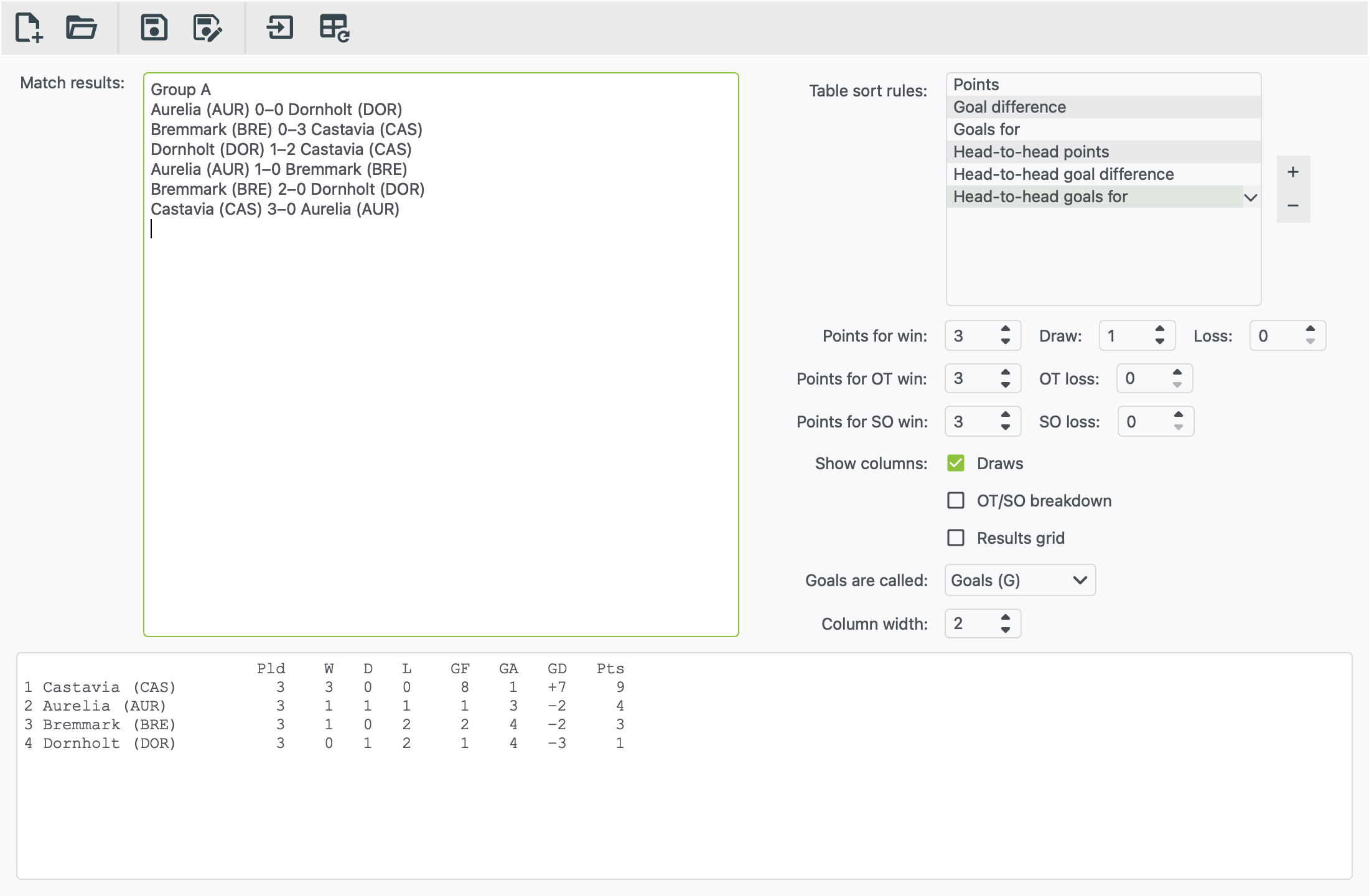
Making a table
- Add your results to the Match results box. Either:
- click Import match results… (the arrow-into-box button) and pick a results file. Each file you import is added to the end of the box, so you can import Matchday 1, then Matchday 2, and so on; or
- type or paste results into the box, one match per line.
- Check the settings on the right. The defaults suit football.
- Click Generate table (the table button with the circular arrow). You can also press F5, or ⌘ R on a Mac.
The table appears at the bottom, ready to copy and paste.
Editing results
If you change the text in the Match results box, click Generate table again to update the table.
How results need to look
One match per line: home team, score, away team.
Aurelia 3–1 Bremmark
Castavia 2-2 Dornholt
Elsmere 1:0 Farrowland
- The score can be written with a dash (
–or-) or a colon (:). -
Extra time and shoot-outs are understood too:
Aurelia 2–1 OT Bremmark
Castavia 1–1 Dornholt (1–1 AET) (4–3 pen.)
Words such as OT, AET, extra time, golden goal, SO, pen. and shootout are all recognised.
-
Other lines are ignored. Headings such as "Group A", blank lines and tables copied from elsewhere can stay in the box.
- It makes one table. For a group stage, generate each group separately: paste in only that group's matches.
- Team names must match exactly. "Aurelia" and "Aurelia (AUR)" count as two different teams. Results exported from xkoranate include the team code when Show team names is on, which is fine as long as every matchday is the same.
Settings
| Setting | What it does |
|---|---|
| Table sort rules | What decides places, in order. Usually points, then goal difference, then goals scored. Drag to reorder. + adds a rule (such as head-to-head, away goals or coin flip) and − removes one. |
| Points for win / draw / loss | Points awarded for each result. The defaults are 3, 1 and 0. |
| Points for OT win / OT loss, SO win / SO loss | Points for wins and losses in overtime (OT) or a shoot-out (SO). These copy the normal win and loss points until you change them. |
| Show columns: Draws | Adds a D column. Untick it for sports without draws. |
| Show columns: OT/SO breakdown | Splits wins and losses into regular time, overtime and shoot-out columns |
| Show columns: Results grid | Adds a grid of every head-to-head result next to the table |
| Goals are called | Changes the column labels to Goals (GF/GA), Korfs, Points or Runs, to suit the sport |
| Column width | Makes the number columns wider or narrower |
Saving
Save file keeps your results and your settings, as a .xml file.
Open it again later, import the next matchday's results, and click
Generate table to bring the table up to date.
New file clears everything and starts again.
Press F1 in the table generator window to open this page.